Get a Slack alert when a target account visits your site
Last updated 2026-11-01 · by Venu Gopal Reddy Muvva, founder
You can get Slack alerts when a company visits your site. Set rules to filter by intent score, ICP fit, or specific pages. Each alert includes an AI summary and a suggested opener to start the conversation.
Steps
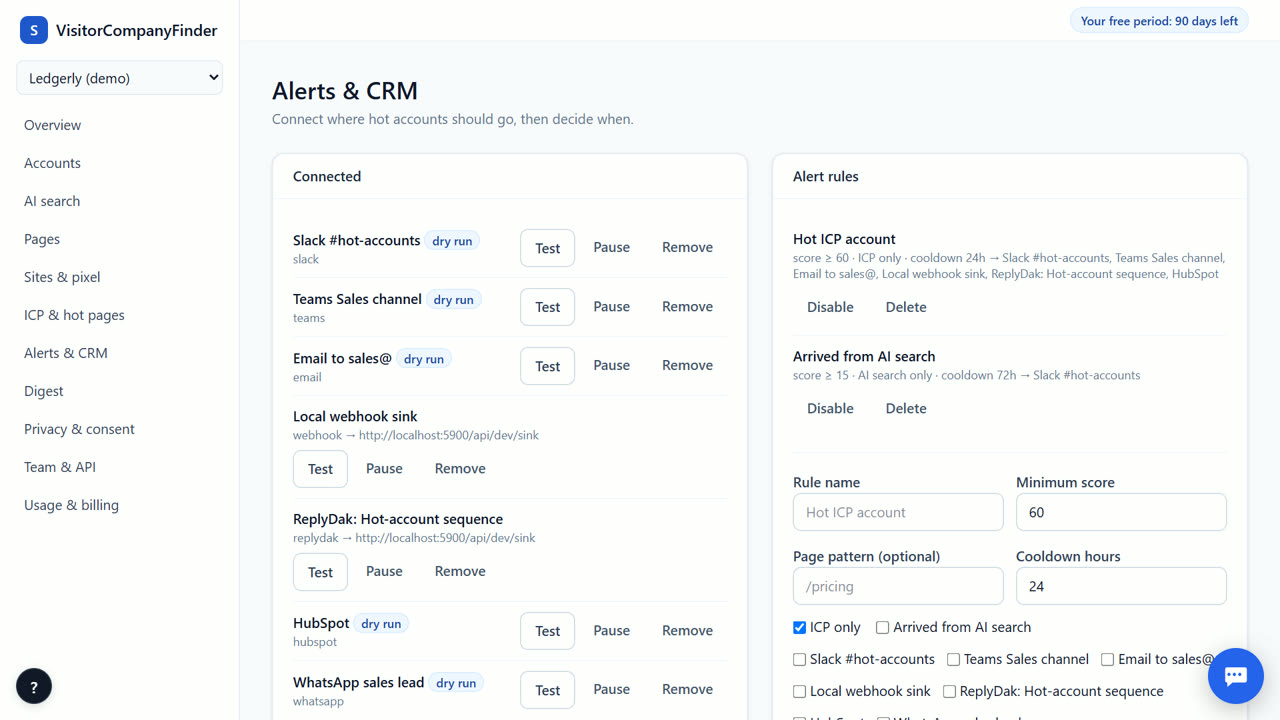
- Connect Slack. Go to Alerts & CRM in your dashboard. Paste your Slack incoming webhook URL to link your workspace.
- Create an Alert Rule. Define when to send alerts. Set a minimum intent score, require ICP fit, or target specific page patterns like /pricing.
- Set Cooldown. Choose a cooldown period to prevent spam. This limits how often you get alerts for the same company within a set time.
- Review Delivery Log. Check the delivery log to confirm alerts were sent. This helps you verify that your webhook is working correctly.
How the Alert Works
When a company matches your rules, VisitorCompanyFinder sends a message to your chosen Slack channel. The message includes the company name, their current intent score, and the pages they visited. It also contains a three-line AI summary of their behavior and a suggested first line to send. This gives your sales team immediate context without opening the dashboard. The AI summary is generated by our own server and does not identify individual people who did not opt in.
Setting Alert Rules
You control exactly when alerts trigger. Set a minimum intent score to only hear about hot accounts. Require ICP fit to focus on your ideal customer profile. Use page patterns to alert only when visitors view high-value pages like pricing or demo booking. You can also set a cooldown period to avoid repeated alerts for the same company. These rules ensure your team focuses on the most relevant opportunities without getting overwhelmed by noise.
Delivery and Verification
After sending an alert, you can check the delivery log to confirm it reached Slack. This log shows timestamps and status for each notification. If an alert fails, the log helps you troubleshoot. You can also test your webhook connection before going live. This ensures your team receives alerts reliably. The system respects your privacy settings and only sends data for companies that match your configured rules.
Integration with CRM
Slack alerts are good for quick awareness, and you can also push the same accounts to your CRM. With HubSpot, Salesforce, Zoho CRM or Pipedrive connected by API token, an alert rule can create or update the company there with the intent score and AI summary. One rule can send to Slack, your CRM, or both. CRM sync is not metered, so it stays free after the free period too.
When VisitorCompanyFinder is not the right tool
VisitorCompanyFinder is not for identifying individual people who did not opt in. It works at the company level only. If you need person-level identification for US visitors, consider RB2B. If you need a large European company database, Dealfront or Leadfeeder may be better. It is not a replacement for your full CRM, but a tool to feed it with intent data.
Questions
Does the alert identify the specific person visiting?
No. VisitorCompanyFinder identifies the company behind the visit. It never identifies individual people who did not opt in. This ensures compliance with GDPR and the DPDP Act.
Can I set different rules for different Slack channels?
Yes. You can create multiple alert rules and direct each to a different Slack channel. For example, send high-score alerts to your sales channel and lower-score alerts to a marketing channel.
What if my Slack webhook is wrong?
If the webhook URL is incorrect, alerts will not be delivered. Check the delivery log for errors. You can test the connection in the settings to ensure it works before relying on it.
Related
- Microsoft Teams alerts for website visitors
- A daily or weekly digest of companies that visited
- VisitorCompanyFinder vs RB2B
- Pricing: 3 months free, then at cost
No card needed. Questions? Ask our assistant (bottom right).