How to identify companies visiting your website
Last updated 2026-11-01 · by Venu Gopal Reddy Muvva, founder
VisitorCompanyFinder identifies companies by matching each visit's IP address to the organisation that owns the network. Home broadband, mobile, VPN and cloud visits are never guessed; they show as unattributed. Company names currently come from demo IP data until a licensed dataset is connected.
Steps
- Add the pixel. Copy the script tag from your dashboard and paste it before the closing head tag on every page of your website.
- Set your ICP. Define your ideal customer profile by industry, country, and company size. This helps the tool prioritize relevant accounts.
- Check the match rate. View the match-rate meter to see the percentage of traffic tied to specific companies versus unattributed visits.
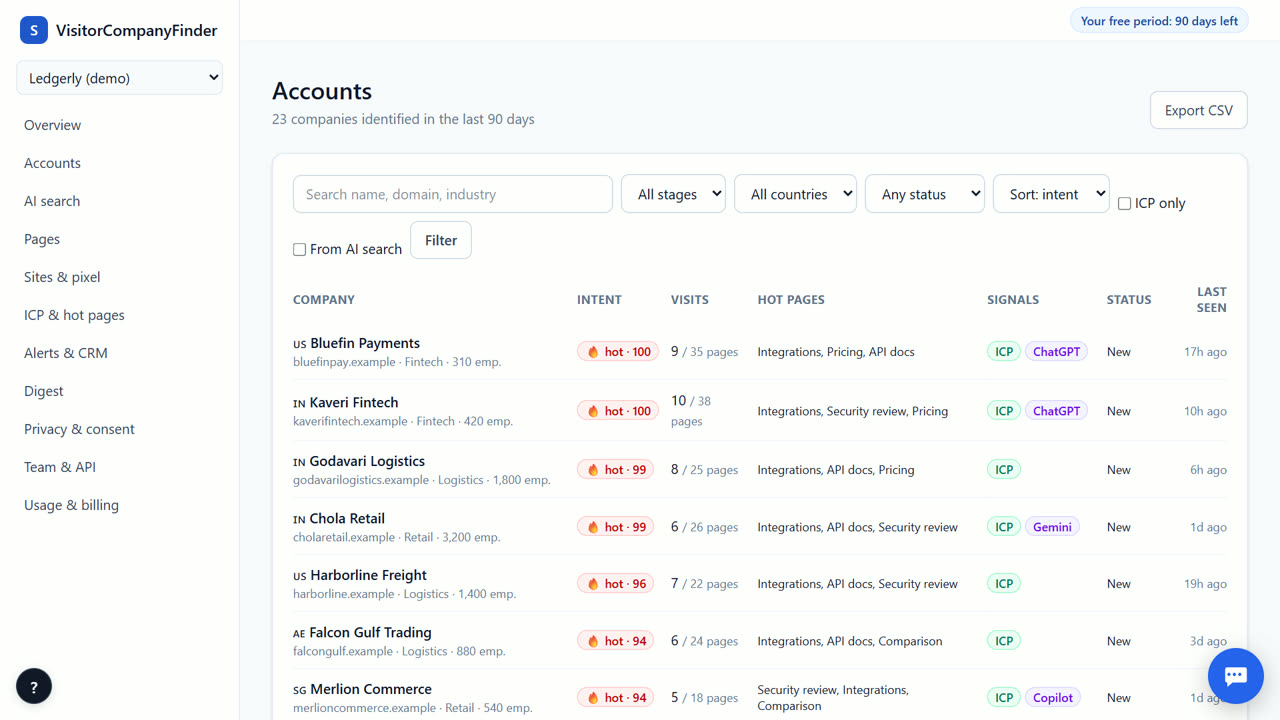
- Review the accounts list. Open the Accounts page to see companies ranked by intent score. Click any company to view its visit timeline and AI summary.
How IP matching works
The tool uses reverse IP lookup to find the organization behind a visit. It supports both IPv4 and IPv6 addresses. If a visit comes from home broadband, a mobile network, a VPN, or a cloud host, the tool does not guess a company name. Instead, it marks that visit as unattributed. This keeps your data honest and prevents false leads from entering your pipeline.
Demo data and licensed data
Currently, company names come from demo IP data. This means real visitors are counted, but most will show as unattributed until a licensed IP-to-company dataset is connected. This feature is coming soon. Until then, you can still track visit patterns, page views, and intent scores. The match-rate meter shows exactly how much traffic could be tied to a company, so you always know the limits of the data.
Understanding the match-rate meter
The match-rate meter displays the share of visits that could be tied to a company. A high match rate means most traffic comes from identifiable business networks. A lower rate indicates more traffic from home or mobile connections. This transparency helps you understand your audience. It also shows you how much data is available for your sales team to act on without any hidden assumptions.
Viewing identified accounts
Once a company is identified, it appears in your Accounts list. Each entry includes an intent score from 0 to 100. You can click an account to see a timeline of its visits. The system also provides a three-line AI summary and a suggested opening line for your outreach. This helps your team start conversations with context, without needing to dig through raw logs or guess intent.
When VisitorCompanyFinder is not the right tool
VisitorCompanyFinder is not for identifying individual people who did not opt in, and it is not a source of person-level contacts for ads. If you need named company data for most visits today, Dealfront (Leadfeeder) has its own long-built database, and RB2B identifies US visitors at person level. Both cost more after our free period, and their privacy models differ from ours.
Questions
Does it identify individual visitors?
No. It identifies companies only. It never identifies individual people who did not opt in to tracking. This design respects privacy laws like GDPR and the DPDP Act.
Why do some visits show as unattributed?
Visits from home broadband, mobile networks, VPNs, or cloud hosts are marked as unattributed. The tool does not guess company names for these sources to maintain data accuracy and honesty.
Is the company data real?
Company names currently come from demo IP data. A licensed IP-to-company dataset is coming soon. Until then, you can track visit behavior and intent scores, but company names may be limited.
How does the intent score work?
The score ranges from 0 to 100. It increases when a company visits hot pages like pricing or demo pages. The score halves every 14 days if there is no new activity from that company.
Related
- Reverse IP lookup for website visitors, honestly
- What a website intent score is and how ours works
- VisitorCompanyFinder vs RB2B
- Pricing: 3 months free, then at cost
No card needed. Questions? Ask our assistant (bottom right).