Send website visitor companies to HubSpot
Last updated 2026-11-01 · by Venu Gopal Reddy Muvva, founder
VisitorCompanyFinder sends companies to HubSpot when they match your alert rule. You connect HubSpot by pasting a private-app token. Each sync creates or updates the company by its domain and adds a note with the intent score, the AI summary and the suggested opener.
Steps
- Create a private app in HubSpot. In HubSpot, create a private app with read and write access to companies, then copy its access token.
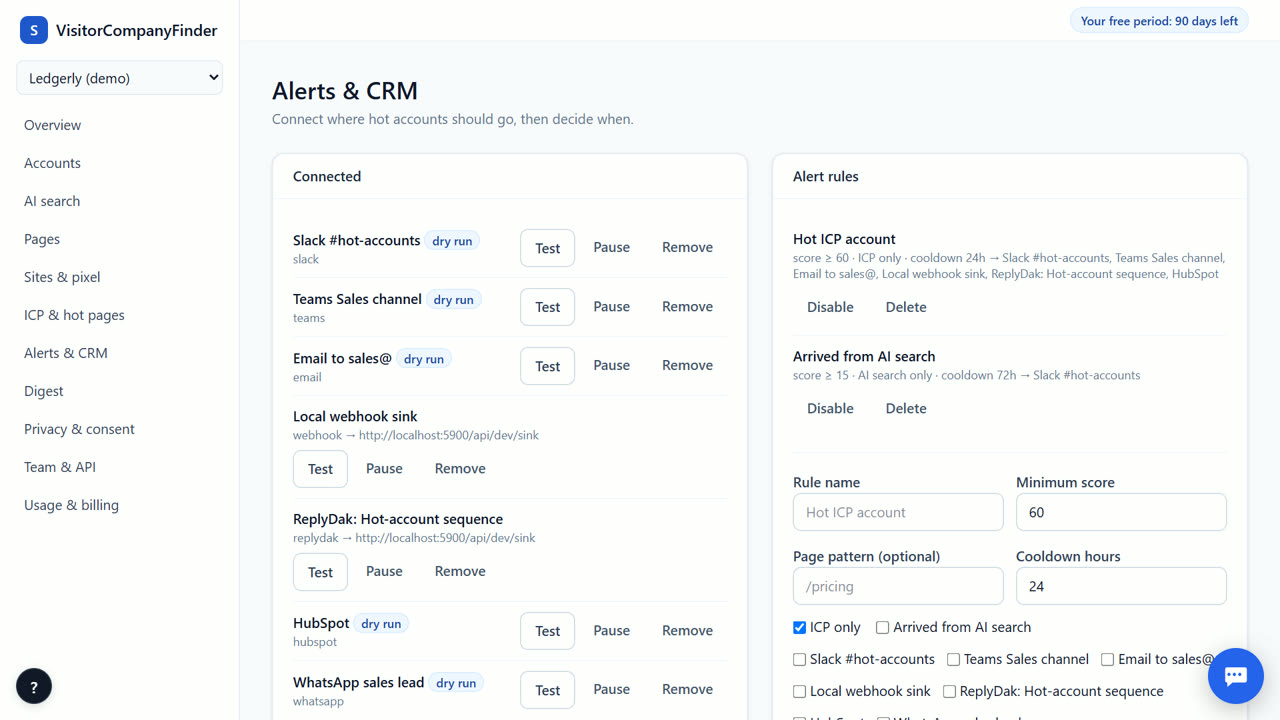
- Paste the token in VisitorCompanyFinder. Open Alerts & CRM, choose HubSpot and paste the token. It is used only to create and update company records.
- Set your alert rules. Decide which visits should trigger a sync. You can set a minimum intent score, limit it to your ideal customer profile, or target specific pages like your pricing page.
- Monitor the delivery log. Check the delivery log to see which companies were sent to HubSpot and when. This helps you confirm that data is flowing correctly into your CRM.
How the sync works
When an account matches your alert rule, VisitorCompanyFinder upserts the company in HubSpot by its domain: it creates the company if it is new and updates name, country, city and employee count if it exists, so you get no duplicates. It then adds a note to the company with the intent score, the pages read, the AI summary and the suggested opener. Your sales team sees the latest intent inside HubSpot without manual entry.
Setting up the connection
Create a private app in your HubSpot settings with permission to read and write companies, and copy its token. Paste it under Alerts & CRM in VisitorCompanyFinder. One-click OAuth connect is not available yet, so the token is the way to connect today. Salesforce, Zoho CRM and Pipedrive work the same way with their own tokens.
Checking delivery status
Every sync attempt is recorded in the delivery log under Alerts & CRM: the time, the account, the destination and the result. If HubSpot rejects a request, the log keeps the error text, which usually points to a wrong token or a missing companies permission. Dry run means the payload was logged but not sent, because the destination has no token yet.
Data privacy and consent
VisitorCompanyFinder only sends company-level data to HubSpot. It never identifies individual people who did not opt in. If you use strict consent mode, no data is stored on the visitor's device before they agree. This ensures your HubSpot records comply with GDPR and the DPDP Act. The AI summary is generated by our servers and does not expose raw IP addresses. You remain in control of what data is shared and when it is sent to your CRM.
When VisitorCompanyFinder is not the right tool
Do not use this if you need person-level contact data for anonymous visitors: VisitorCompanyFinder does not identify individuals, by design. If your process needs the name and title of each visitor, look at RB2B or Vector. If your whole stack is HubSpot and you already pay for it, HubSpot Breeze Intelligence may be simpler. One-click OAuth connect is not available yet.
Questions
Do I pay extra for HubSpot sync?
No. CRM sync is not metered: it is free in the 3-month free period and after it.
Can I update existing companies in HubSpot?
Yes. If the company already exists in your HubSpot account, the tool updates the record with the new intent score and summary. It does not create duplicate company records.
Is one-click OAuth available?
No, one-click OAuth is coming soon. You must currently use a private app token to connect HubSpot. This method is secure and works well for most teams.
What data is sent to HubSpot?
The company's name, domain, country, city and employee count, plus a note with the intent score, visits, hot pages, AI summary and opener. Raw IP addresses are never sent.
Related
- Website visitor companies in Zoho CRM
- Send hot accounts to your cold-email tool
- VisitorCompanyFinder vs Clearbit Reveal / HubSpot Breeze
- Pricing: 3 months free, then at cost
No card needed. Questions? Ask our assistant (bottom right).