Microsoft Teams alerts for website visitors
Last updated 2026-11-01 · by Venu Gopal Reddy Muvva, founder
You can send real-time alerts and digests to Microsoft Teams using a Workflows webhook URL. The same rules as Slack apply, including minimum intent scores and ICP filters. This helps your team spot hot accounts without leaving their chat.
Steps
- Create a Teams Workflow. In Microsoft Teams, create a new workflow that triggers when a message is received. Copy the webhook URL it generates.
- Connect the webhook. Go to Alerts & CRM in VisitorCompanyFinder. Paste your Teams webhook URL into the Microsoft Teams field to link your channel.
- Set alert rules. Define when alerts fire. Set a minimum intent score, limit alerts to your ICP, or trigger only on specific pages like pricing.
- Enable the digest. Turn on the daily or weekly digest under the Digest tab. Choose Microsoft Teams as the delivery destination for a regular summary.
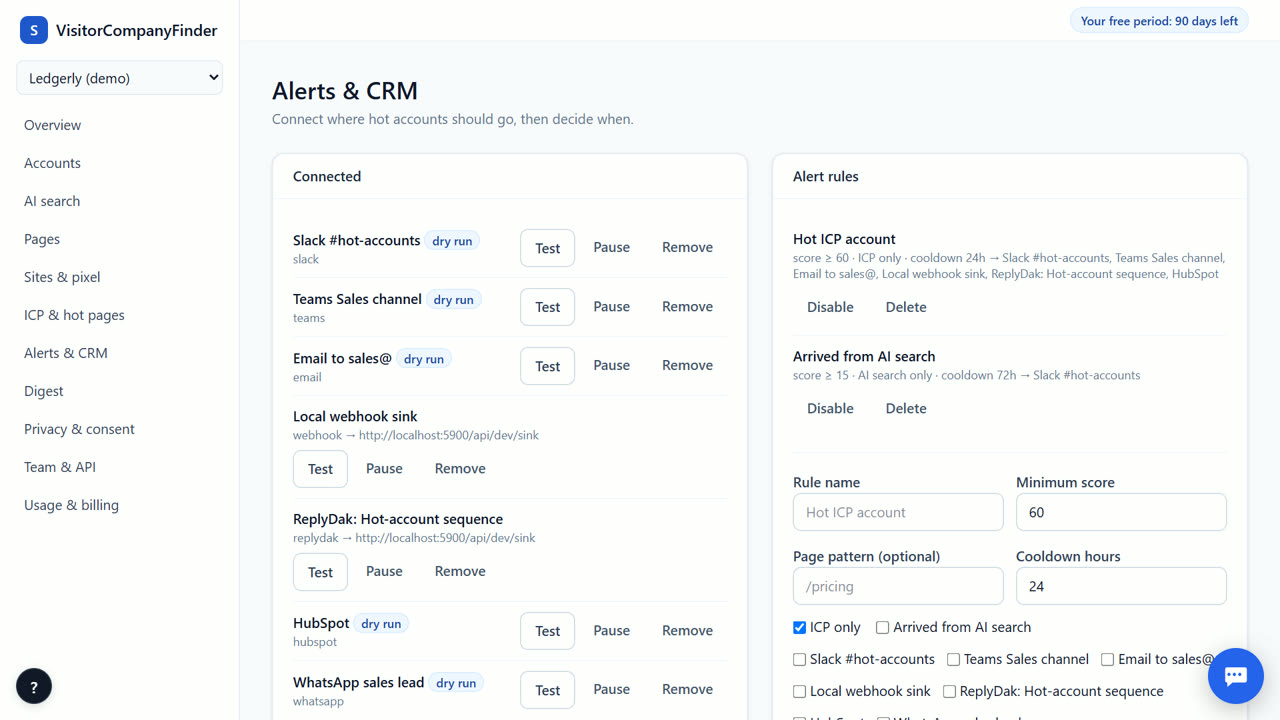
How the Teams webhook works
VisitorCompanyFinder sends data to your Microsoft Teams channel using a standard Workflows webhook. You create a workflow in Teams that listens for incoming messages. We send a formatted message containing the company name, intent score, and AI summary. This requires no extra software installation on your team's computers. The connection is secure and uses the URL you provide directly in our settings.
Alert rules and filtering
You control exactly when your team gets notified. Use the same rules for Teams as you do for Slack. Set a minimum intent score to avoid noise from low-interest visits. Restrict alerts to your Ideal Customer Profile so you only hear about relevant companies. You can also trigger alerts only when a visitor lands on a specific page, such as your pricing page. A cooldown period prevents repeated alerts for the same company.
Daily and weekly digests
Real-time alerts are great for hot leads, but digests give you a broader view. Enable a daily or weekly digest to send a summary of all identified companies to your Teams channel. The digest includes the top accounts by intent score and any new activity. This is useful for weekly sales meetings or for marketers reviewing campaign performance. You can preview the digest format before sending it to your team.
Privacy and consent
Alerts only include company-level data. We never identify individual people who did not opt in. If you use strict consent mode, nothing is stored on the visitor's device before they agree, and raw IP addresses are never stored. The AI summary and opener are written by Surge's own AI server from company-level signals only. You are still the controller of your visitors' data and need your own privacy notice.
When VisitorCompanyFinder is not the right tool
If you need person-level identification of individual visitors, VisitorCompanyFinder is not the right tool. We do not offer this by design to protect privacy. For US-only person-level data, consider RB2B. If you need a large, all-in-one signal platform with dedicated onboarding support, Warmly might be a better fit, though it costs significantly more. We focus on company-level intent for B2B teams that value privacy and low cost.
Questions
Do I need to install anything on my computer?
No. You only need to create a workflow in Microsoft Teams and copy the webhook URL. Paste that URL into VisitorCompanyFinder. Your team sees alerts in their existing Teams channel without new software.
Can I set different rules for Teams than for Slack?
Yes. You can configure separate alert rules for each channel. For example, you might send all hot accounts to Slack but only ICP-matched accounts to Teams. This lets you tailor notifications to different teams' needs.
What information is included in the Teams alert?
Each alert includes the company name, intent score, pages visited, and an AI-generated summary. It also includes a suggested first line for outreach. This gives your sales team enough context to start a conversation immediately.
Is the digest available for Microsoft Teams?
Yes. You can choose Microsoft Teams as the destination for your daily or weekly digest. The digest summarizes all identified companies and their activity over the period, providing a broader view than individual alerts.
Related
- Get a Slack alert when a target account visits your site
- A daily or weekly digest of companies that visited
- VisitorCompanyFinder vs Dealfront (Leadfeeder)
- Pricing: 3 months free, then at cost
No card needed. Questions? Ask our assistant (bottom right).