What a website intent score is and how ours works
Last updated 2026-11-01 · by Venu Gopal Reddy Muvva, founder
The intent score is a 0-100 estimate of how ready a company is to buy. It rises when visitors view hot pages, spend time on your site, or return. The score halves every 14 days if there is no new activity.
Steps
- Define your ICP. Go to ICP & hot pages. List the industries, countries, and company sizes you sell to. Accounts that fit this profile score 25% higher.
- Mark hot pages. Select the URLs that signal buying interest. Common examples are your pricing page or demo booking page. Visits to these pages boost the score.
- Monitor the score. Open the Accounts view. You will see companies ranked by their current intent score. Click a company to see the specific visits that raised the number.
- Check the decay. Note the last activity date. If a company does not visit for 14 days, their score halves. This keeps your list focused on recent interest.
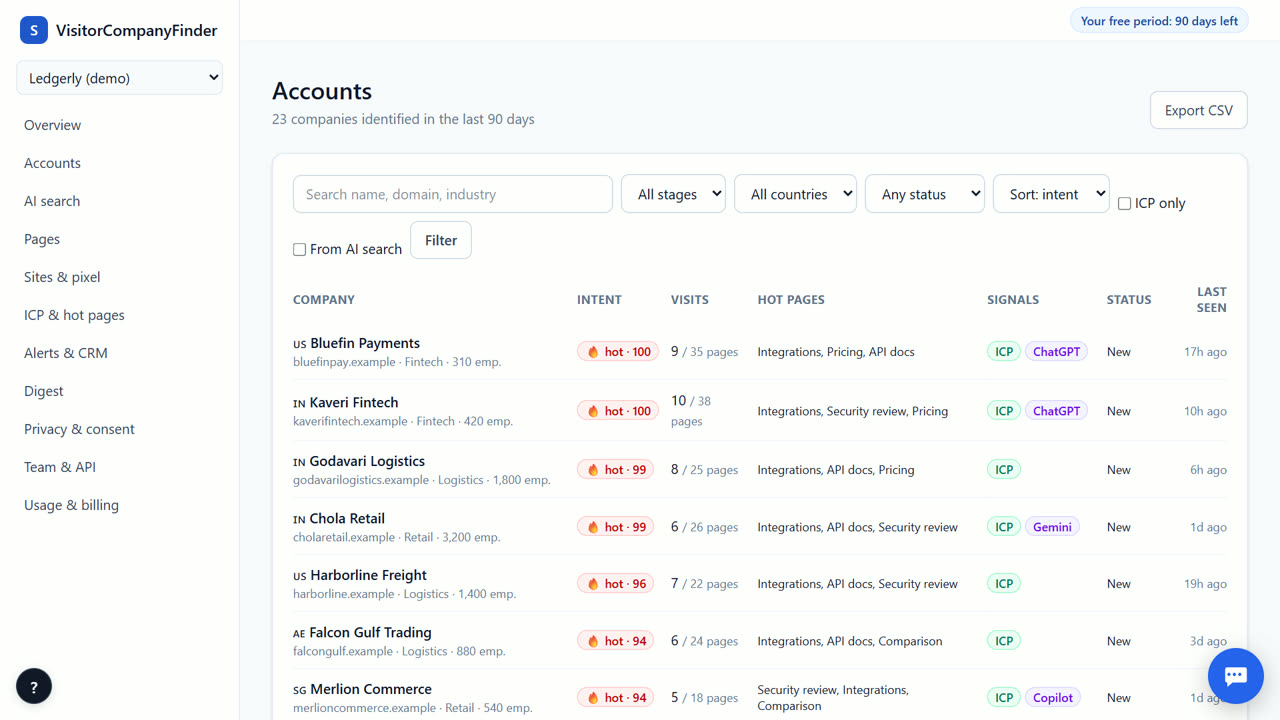
How the score is built
The score combines several signals. It counts page views and time spent on your site. It adds weight when a visitor returns or arrives from AI search tools like ChatGPT. It also includes opted-in form fills. Each signal contributes to the total. The system ignores home broadband and mobile traffic. This ensures the score reflects business intent, not casual browsing. The result is a single number from 0 to 100.
The 14-day half-life
Intent fades over time. Our score uses a 14-day half-life. This means the score cuts in half every two weeks without new activity. If a company visited last month but not this week, their score drops. This prevents old data from cluttering your list. You always see who is interested right now. The decay is automatic. You do not need to adjust it. It keeps your pipeline fresh and relevant.
Setting hot pages
Hot pages are URLs that show strong buying intent. You choose which pages count as hot. Typically, this includes your pricing page, feature details, or demo request page. When a company visits these pages, their score increases significantly. You can add multiple URLs. Be specific. Do not mark your homepage as a hot page. It is too general. Focus on pages that signal a decision is being made. This helps the score reflect true readiness to buy.
ICP fit and alerts
Your Ideal Customer Profile (ICP) matters. If a company matches your ICP, their score is 25% higher. This ensures you prioritize the right accounts. You can set alert rules based on the score. For example, alert when a score hits 60. This is our threshold for 'hot'. You can also filter by ICP fit. This way, you only get notified for accounts that match your criteria. It saves time and reduces noise.
When VisitorCompanyFinder is not the right tool
VisitorCompanyFinder is not a person-level identification tool. It does not identify individual employees who did not opt in. If you need to know the specific name and email of a visitor, you should use a tool like RB2B or Vector. Those tools offer person-level data for US visitors. We focus on company-level intent. This keeps us compliant with GDPR and the DPDP Act. We do not guess individual identities. We only report the organization behind the IP address.
Questions
What score is considered hot?
A score of 60 or higher is considered hot. This indicates strong buying intent. You can set alerts to notify your team when a company reaches this threshold. The score reflects recent activity and engagement.
Does the score include AI search traffic?
Yes. Visits from ChatGPT, Perplexity, Gemini, Copilot, or Claude count toward the score. We track these AI-search referrals separately. They signal high intent because the user is actively researching solutions.
How does ICP fit affect the score?
If a company matches your Ideal Customer Profile, their score is 25% higher. This weighting ensures you prioritize accounts that fit your business model. You define the ICP in your settings. The system applies this boost automatically.
Can I change the decay rate?
No. The 14-day half-life is fixed. This standard rate ensures consistent scoring across all accounts. It balances recency with sustained interest. You cannot customize the decay period in the current version.
Related
- How to identify companies visiting your website
- Get a Slack alert when a target account visits your site
- VisitorCompanyFinder vs Vector
- Pricing: 3 months free, then at cost
No card needed. Questions? Ask our assistant (bottom right).