Write a first line to a company that visited your site
Last updated 2026-11-01 · by Venu Gopal Reddy Muvva, founder
VisitorCompanyFinder uses its own AI server to write a three-line account summary and a first line for you. The opener never says you saw them on your site. You can regenerate the text or send it directly to your CRM or cold-email tool.
Steps
- View the account. Open the Accounts list and click on a company to see its visit timeline and details.
- Read the AI summary. Look at the three-line brief and the suggested first line generated by our AI server.
- Regenerate if needed. Click Regenerate on the account page to get a fresh summary and opener.
- Send the message. Copy the opener into your own email, or push the account to your connected CRM, webhook or cold-email tool.
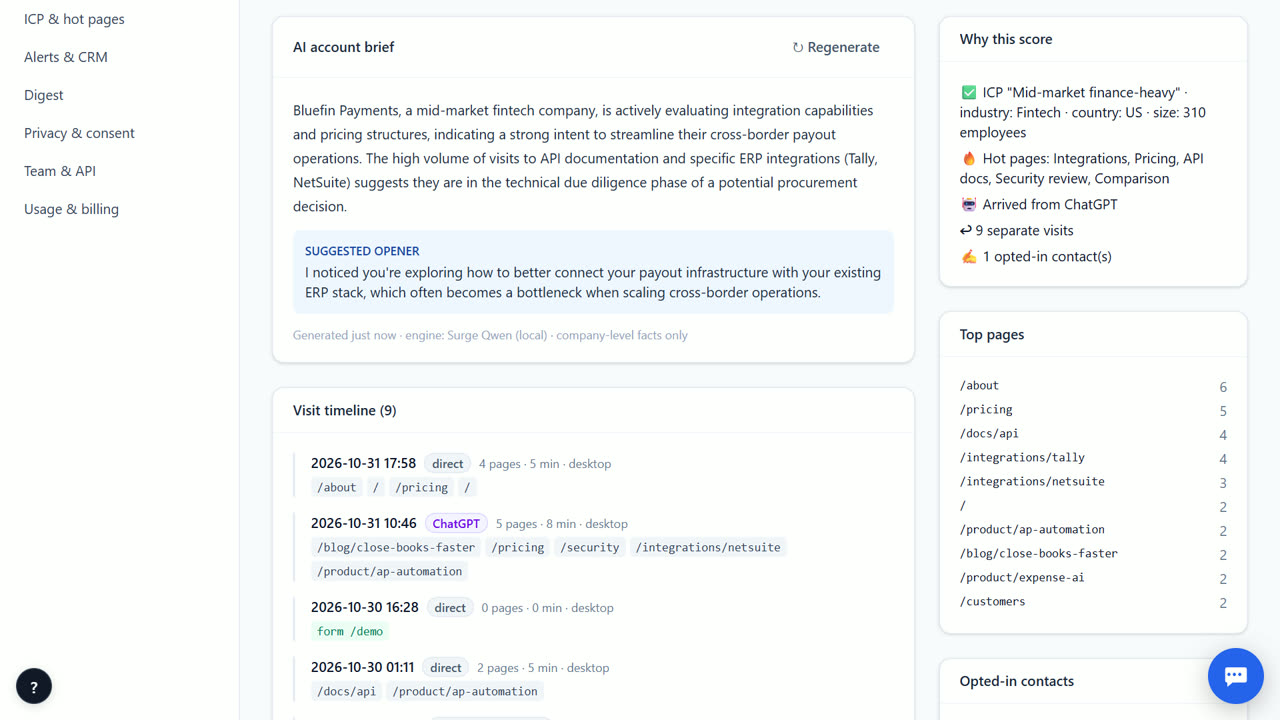
How the AI writes the opener
Our AI server creates a short, professional first line based on the company's activity. It focuses on their business context, not their browsing behavior. The text never mentions that they visited your website or that you are tracking them. This keeps your outreach respectful and compliant with privacy laws. You can review the tone before you send it to ensure it fits your brand voice.
Regenerate for better fit
If the first suggestion does not feel right, click Regenerate on the account page. The AI writes a new summary and opener from the latest visits, without leaving the page. The new text replaces the old one. Regenerating also helps after a company has come back and read new pages, because the brief then reflects what it looked at most recently. After the free period each brief costs about ₹0.03 at our cost.
Sending to your tools
Once you have the right text, send the account on. Under Alerts & CRM you can connect HubSpot, Salesforce, Zoho CRM or Pipedrive with an API token, a signed webhook, or your cold-email tool (ReplyDak is built in). The summary and opener travel with the account, so the next person sees the same context. You can also copy the opener and use it in your own email.
Privacy and compliance
The summary and opener use only company-level signals: the company's industry, size, the pages it read, its score and whether it fits your ideal customer profile. They never mention that the company visited your site or that you track visits. People are only included when they opted in on a form or chat. This keeps outreach respectful. You are still responsible for following the outreach rules in your market.
When VisitorCompanyFinder is not the right tool
This feature is not for identifying individual people who did not opt in. If you need person-level contact details or want to track specific employees, this tool will not help you. For that, you might look at tools like RB2B or Vector, though they have different privacy implications. VisitorCompanyFinder focuses on company-level intent to keep your outreach compliant and respectful.
Questions
Does the AI mention that I visited the site?
No. The opener never says you saw them on your website. It focuses on their business needs and your product value.
Can I change the tone of the message?
You can regenerate the opener for a new version. To change the wording yourself, copy it and edit it in your own email.
Where does the AI get the information?
It uses the company's intent score, pages visited, and ICP fit. It does not use personal data from individual visitors.
Can I send this to my CRM?
Yes. You can connect HubSpot, Salesforce, Zoho, or Pipedrive. You can also use webhooks or the API to send the text.
Related
- Send hot accounts to your cold-email tool
- Website visitor tracking for B2B founders
- VisitorCompanyFinder vs Warmly
- Pricing: 3 months free, then at cost
No card needed. Questions? Ask our assistant (bottom right).