Send hot accounts to your cold-email tool
Last updated 2026-11-01 · by Venu Gopal Reddy Muvva, founder
You can send hot accounts to your cold-email tool using signed webhooks or the built-in ReplyDak integration. This creates a two-way link where replies from prospects appear in the account timeline. We never send cold email for you.
Steps
- Connect your tool. Go to Alerts & CRM and paste your cold-email tool's webhook URL or connect ReplyDak.
- Set alert rules. Define which accounts trigger a send, such as a minimum intent score or specific pages.
- Send the account. The system sends the account data to your tool when an alert rule is met.
- Track replies. If using ReplyDak, replies from prospects automatically appear in the account timeline.
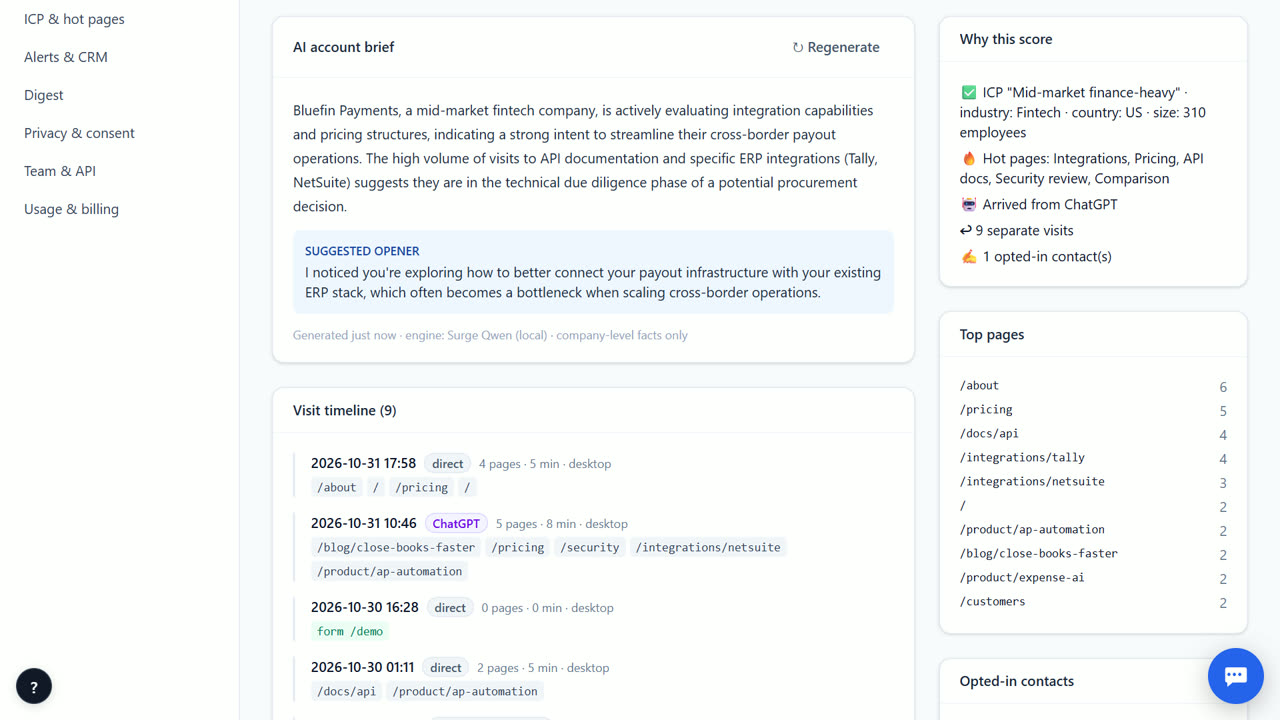
How the two-way loop works
When an account hits your alert rules, VisitorCompanyFinder sends it to your cold-email tool. If you use the built-in ReplyDak pairing, any reply from the prospect comes back to the account timeline in our app. This keeps your outreach and website intent in one view. You control the email content and sending; we only pass the account data.
Using signed webhooks
You can also use signed webhooks to push accounts to any tool that accepts HTTP requests. We sign each request so your server can verify it came from us. This works with custom scripts or other marketing platforms. You must handle the incoming data and trigger your email sends. This option is flexible but requires some technical setup on your end.
API and CSV export
If you prefer to pull data rather than push it, use the REST API to fetch account lists and details. You can also export data as a CSV file for manual import into your email tool. The API supports standard methods for listing and retrieving accounts. This is useful if your cold-email tool does not support webhooks or if you want to batch process accounts.
When VisitorCompanyFinder is not the right tool
This feature is not for teams that want VisitorCompanyFinder to write or send cold emails for them. We provide the account data and the connection, but you must manage your email content and sending through your own tool. If you need a full email marketing platform with built-in visitor identification, look at tools like Warmly or HubSpot Breeze Intelligence instead.
Questions
Do you send the cold emails for me?
No. We send the account data to your tool. You write and send the emails using your own platform or the ReplyDak integration.
What is the ReplyDak pairing?
It is a built-in connection to the ReplyDak cold-email tool. It allows replies from prospects to flow back into the account timeline in VisitorCompanyFinder automatically.
Can I use this with any email tool?
Yes, if your tool accepts webhooks. You can use signed webhooks to send account data to any system that can process HTTP requests.
How do replies come back?
With the ReplyDak pairing, replies come back to the account timeline automatically. With other tools, replies stay in that tool; only the ReplyDak pairing brings them back today.
Related
- Send website visitor companies to HubSpot
- Write a first line to a company that visited your site
- VisitorCompanyFinder vs Koala
- Pricing: 3 months free, then at cost
No card needed. Questions? Ask our assistant (bottom right).