See which accounts your campaigns bring to the site
Last updated 2026-11-01 · by Venu Gopal Reddy Muvva, founder
VisitorCompanyFinder shows you which companies arrive from your campaigns and AI-search tools. It tracks UTM parameters and referrers for each visit. You get a weekly digest with account intent scores and page views.
Steps
- Add UTM parameters. Append UTM tags to your campaign links. The pixel records these parameters for each visit.
- Install the pixel. Paste the script tag on your site. It captures referrer data and UTM parameters automatically.
- Check the pages report. Open the Pages report to see which pages identified companies read most.
- Review AI-search arrivals. Use the AI-search report to see which companies came from ChatGPT or Perplexity. This shows new traffic sources.
- Read the weekly digest. Enable the weekly digest in Slack or email. It lists top accounts by intent score and their recent pages.
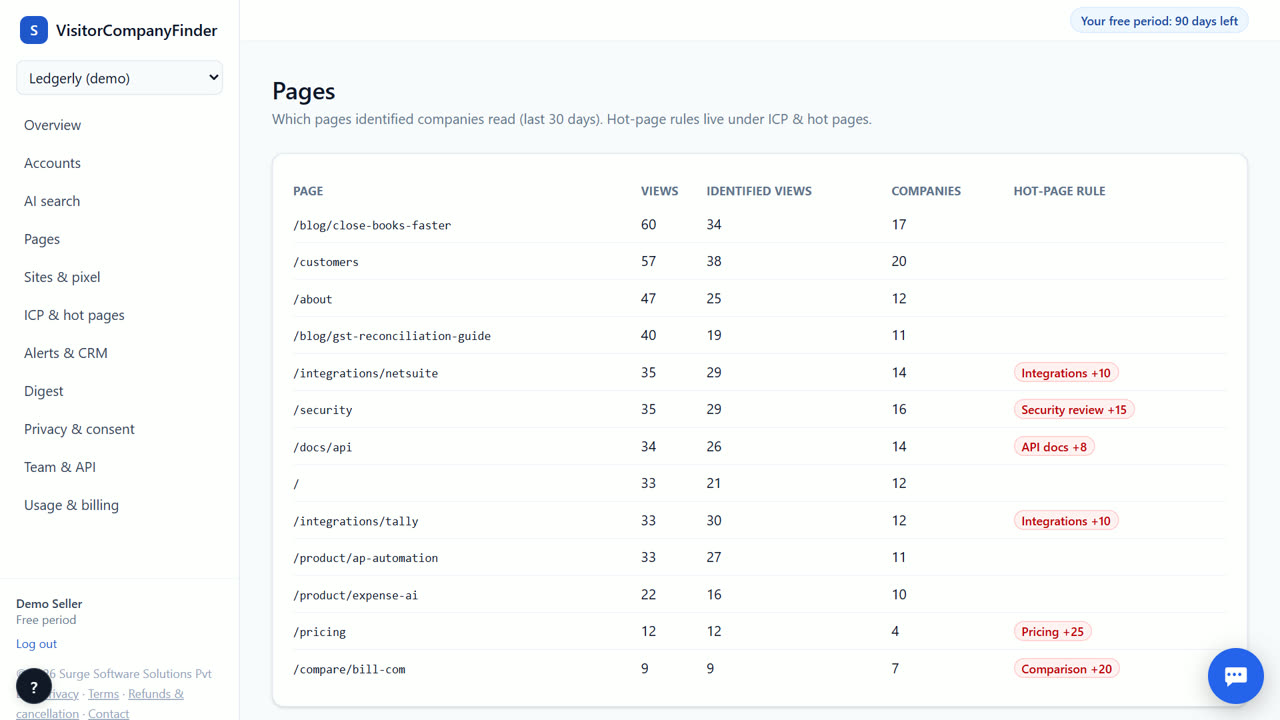
Track campaign performance
You can see which companies arrived from your paid ads, emails or content. The pixel records the UTM source, medium and campaign and the referrer of every visit, and each account's timeline shows them. This helps you see which campaigns bring real B2B interest, not just clicks. Today company names come from demo IP data until licensed data is connected, so most real visits still show as unattributed.
Monitor AI-search traffic
Many B2B buyers now start with AI assistants. The AI-search report shows which companies arrive from ChatGPT, Perplexity, or Gemini. It lists the specific pages they viewed after clicking. This helps you understand if your content answers their questions well. You can see if AI referrals lead to pricing pages. This data is separate from traditional search engine traffic.
Understand visitor intent
The intent score tells you how ready a company is to buy. It looks at pages viewed, time spent, and return visits. Hot pages like pricing increase the score. The score decays if there is no new activity. This helps you prioritize which accounts to contact first. You can filter the list by minimum score. This ensures your team focuses on the hottest leads.
Share insights with your team
The weekly digest sends a summary to Slack, Teams, or email. It lists the top accounts by intent score. It includes the pages they visited and their source. This keeps your sales and marketing teams aligned. You do not have to check the dashboard daily. The digest provides a clear snapshot of weekly activity. It helps you plan your outreach for the week.
When VisitorCompanyFinder is not the right tool
VisitorCompanyFinder is not the right tool if you need person-level identification of anonymous visitors. It does not identify individual people who did not opt in. If you need to build ad audiences based on specific job titles or names, look at Vector or RB2B. Those tools offer person-level data for US visitors. VisitorCompanyFinder focuses on company-level intent and privacy compliance.
Questions
Can I see which campaign brought a visitor?
Yes, if you use UTM tags in your links. The pixel records the source, medium and campaign of each visit, and you see them on the account's visit timeline.
Does it track visits from AI chatbots?
Yes, the AI-search report tracks arrivals from ChatGPT, Perplexity, Gemini, Copilot, and Claude. It shows which companies came from these sources and which pages they viewed.
How is the intent score calculated?
The score is based on pages viewed, time spent, return visits, and form fills. Hot pages like pricing increase the score. The score halves every 14 days without new activity.
Can I filter the digest by campaign?
No. The digest lists the highest-intent accounts for the day or week. Campaign details are on each account's visit timeline.
Related
- Track visitors from ChatGPT, Perplexity and other AI search
- A daily or weekly digest of companies that visited
- VisitorCompanyFinder vs Dealfront (Leadfeeder)
- Pricing: 3 months free, then at cost
No card needed. Questions? Ask our assistant (bottom right).